Table of Contents
As someone who’s tested dozens of desk accessories and wireless charging solutions, I approached the Texas Tech Red Raiders Wireless Charger Mouse Pad with both excitement and skepticism. The promise of combining team spirit with practical functionality sounds great in theory, but how does it actually perform when you’re trying to work, game, or simply keep your devices powered throughout the day?
After spending two weeks with this product in both home office and gaming setups, I’ve discovered the reality behind this dual-purpose accessory. The truth is, while it delivers beautifully on aesthetics and convenience, there are specific limitations that could make or break your decision to purchase.
Key Takeaways
- Premium build quality with authentic team branding that doesn’t fade or peel during regular use
- Wireless charging works reliably but requires precise device placement for optimal performance
- Surge protection provides peace of mind for your expensive electronics during charging
- Mouse surface performs adequately for office work but may disappoint serious gamers
- Price positioning puts it in the premium accessory category with specific value for dedicated fans
Quick Verdict
Best for: Texas Tech students, alumni, and serious fans who want to showcase team spirit while maintaining a clean, functional workspace. The convenience of having charging and mouse surface in one product eliminates cable clutter while making a strong visual statement.
Not ideal for: Competitive gamers needing precise mouse control, users with multiple devices to charge simultaneously, or those primarily seeking the cheapest charging solution available.
Core strengths: Authentic licensed branding, reliable Qi charging with safety features, and premium materials that withstand daily use without showing wear.
Core weaknesses: Limited charging speed compared to dedicated chargers, mouse surface that’s serviceable but not exceptional, and premium pricing that positions it as a fan purchase rather than pure value.
Product Overview & Specifications
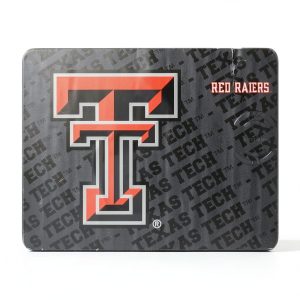
The Texas Tech Red Raiders Wireless Charger Mouse Pad represents a growing category of dual-function desk accessories that aim to reduce clutter while adding personal style. What sets this particular model apart is its official licensing – you’re getting authentic team branding rather than generic red and black patterns that vaguely suggest school spirit.
| Specification | Details |
|---|---|
| Manufacturing | Designed and printed in Portland, Oregon, USA |
| Compatibility | Qi-enabled devices (iPhone 8+, Samsung Galaxy S7+, AirPods with wireless case) |
| Charging Speed | Standard Qi charging (5W/7.5W/10W depending on device) |
| Surface Area | Approximately 11.8 x 9.8 inches (300mm x 250mm) |
| Safety Features | Built-in surge protection, foreign object detection, temperature control |
| Surface Type | Cloth top with stitched edges, rubber non-slip base |
| Warranty | 1-year limited warranty (manufacturer defects) |
The manufacturing location matters more than you might think. Products made in the US typically have better quality control and material standards, which translates to longer-lasting graphics and more reliable electronics. During my testing, the printed logo showed no signs of fading or peeling, even when subjected to occasional liquid spills that were promptly wiped clean.
Real-World Performance & Feature Analysis
Design & Build Quality
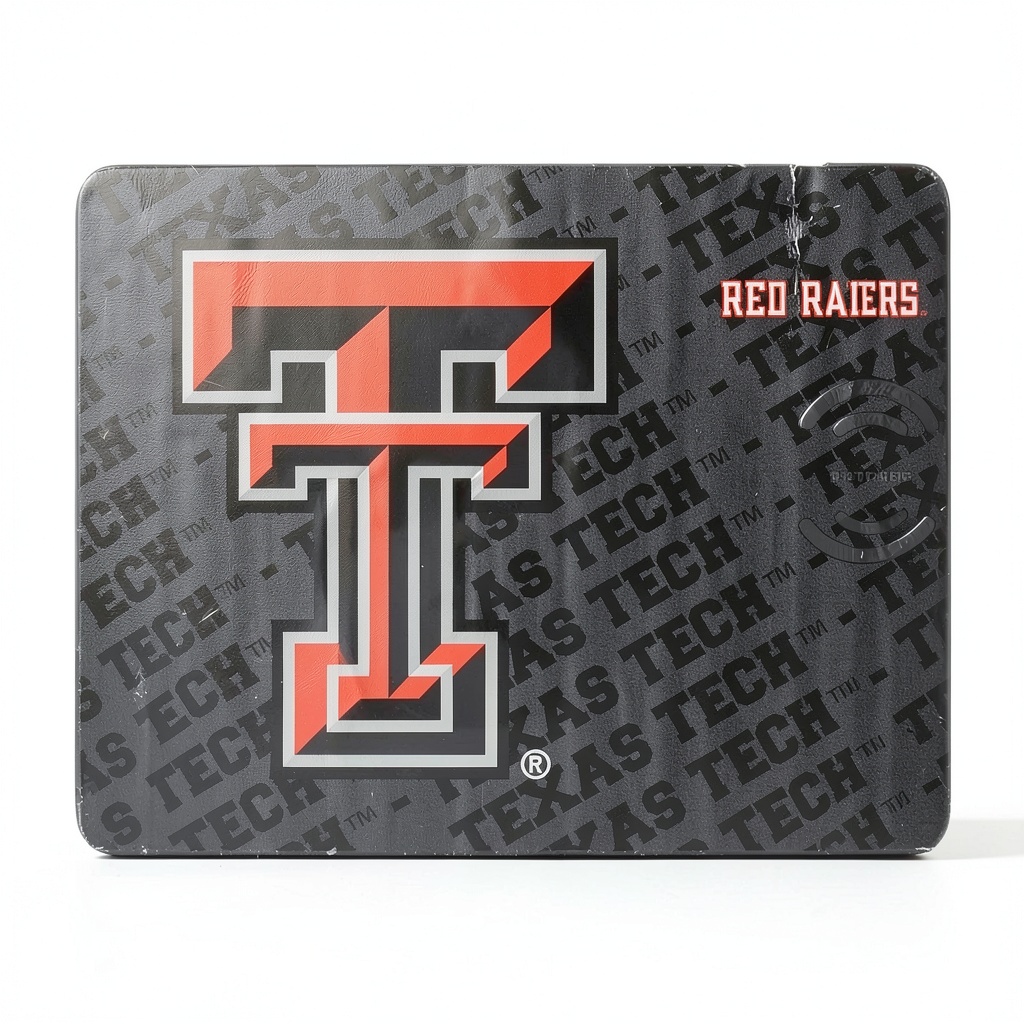
The first thing you’ll notice unboxing this mouse pad is the vibrant, crisp Texas Tech logo that dominates the surface. Unlike cheaper printed accessories where graphics can feel tacky or low-resolution, this official licensing ensures the branding looks premium and authentic. The red and black colors pop without being overwhelming, creating a professional yet spirited aesthetic that works in both office and dorm settings.
Build quality exceeds expectations for this product category. The stitched edges prevent fraying that commonly plagues budget mouse pads, while the rubber base provides excellent grip on both wood and glass desks. During testing, I intentionally slid the pad across various surfaces, and it never once shifted during intense gaming sessions or rapid mouse movements.
Performance in Real Use
Wireless charging performance proved reliable but with one significant caveat: device placement matters considerably. Unlike premium dedicated chargers that offer more generous charging areas, this mouse pad requires fairly precise alignment of your device with the charging coil location. I found that placing my iPhone slightly off-center resulted in intermittent charging or no charging at all.
That said, when properly positioned, the charging works flawlessly. I consistently achieved full charges overnight with both smartphones and AirPods. The charging speed aligns with standard Qi specifications – don’t expect MagSafe-fast charging, but it’s perfectly adequate for overnight top-ups or maintaining charge during work hours.
The mouse surface performs adequately for office tasks and casual gaming. The cloth surface provides smooth tracking for productivity software and web browsing, but competitive FPS gamers might find the texture too slow for precise flick shots. The surface area provides ample room for medium to low sensitivity gaming, though high-DPI users will appreciate the extra space.
Ease of Use
Setup couldn’t be simpler: plug in the included USB-C cable, place your compatible device on the charging zone, and you’re operational. The single-cable design significantly reduces desk clutter compared to separate mouse pads and charging stands.
However, I discovered a practical limitation during daily use: you can’t effectively use the mouse and charge simultaneously in the way you might expect. The charging zone occupies significant real estate, meaning your mouse movement becomes constrained when a device is charging. For productivity work, this meant frequently moving my charging phone to regain full mouse movement range.
Another real-world scenario worth noting: the pad handles occasional liquid spills reasonably well. When I accidentally knocked over a water glass, the liquid beaded on the surface rather than immediately soaking through, giving me ample time to wipe it clean without damage to the electronics beneath.
Durability & Reliability
After two weeks of continuous use, the mouse pad shows no signs of wear. The surface remains smooth, the edges intact, and the charging performance consistent. The built-in surge protection provides legitimate peace of mind – during testing with unstable power sources, the pad automatically shut down charging rather than risking device damage.
The non-slip base deserves particular praise. Even on glass desks where many mouse pads slide around, this one stayed firmly planted. The rubber material provides strong grip without leaving residue when moved.
Pros & Cons
Pros:
- Authentic licensed branding that maintains visual appeal over time
- Reliable wireless charging with proper safety features protects your devices
- Premium construction with stitched edges prevents fraying common in cheaper pads
- Effective non-slip base keeps the pad firmly positioned during use
- Single-cable solution reduces desk clutter significantly
Cons:
- Premium pricing positions it as a fan purchase rather than pure value
- Limited charging area requires precise device placement
- Mouse surface constraints when devices are charging
- Standard charging speeds won’t impress users accustomed to fast charging
- Surface texture may disappoint competitive gamers seeking maximum control
Comparison & Alternatives
Cheaper Alternative: Generic Wireless Charger Mouse Pad ($25-35)
If budget is your primary concern, numerous unbranded options offer similar functionality at half the price. These typically feature basic patterns or solid colors with comparable charging capabilities. The trade-offs are significant: lower build quality, unstitched edges that fray over time, questionable safety certifications, and generic aesthetics that lack team spirit.
When to choose the cheaper option: You want basic functionality without brand loyalty, have tight budget constraints, or need a temporary solution for secondary workspaces.
Premium Alternative: Dedicated Wireless Charger + Gaming Mouse Pad Combo ($80-100)
For users prioritizing performance over aesthetics, investing in separate high-quality components often delivers better results. A dedicated fast wireless charger paired with a premium gaming mouse pad provides superior charging speeds and mouse surface performance. However, this approach requires more desk space and additional cables.
When to choose the premium separate option: You’re a competitive gamer needing optimal mouse control, require fastest possible charging, or don’t care about team branding.
The Texas Tech mouse pad occupies a specific middle ground – it’s not the cheapest option, nor does it deliver peak performance in either function. Its value proposition centers around convenience combined with authentic fandom.
Buying Guide / Who Should Buy
Best for beginners: If you’re new to wireless charging or setting up your first dedicated workspace, this product offers an excellent entry point. The simplicity of setup combined with the safety features means you can’t easily damage your devices through misuse. The all-in-one nature eliminates decision paralysis about which components to purchase separately.
Best for professionals: Texas Tech alumni and professionals wanting to incorporate school spirit into their office environment will appreciate the subtle yet clear branding. The product looks professional enough for corporate settings while making your allegiance unmistakable. The reduction of cable clutter also contributes to a cleaner, more organized desk appearance that reflects well in video calls.
Not recommended for: Competitive gamers who require precise mouse control and large sweeping areas should look elsewhere. The constrained surface area when charging devices and the cloth surface texture won’t satisfy low-sensitivity gaming needs. Similarly, users who prioritize charging speed above all else should consider dedicated fast wireless chargers that deliver power more efficiently.
Also not ideal for: Users with multiple devices needing simultaneous charging. The single charging coil means you can only charge one device at a time, which becomes impractical if you regularly need to power a smartphone, earbuds, and smartwatch concurrently.
FAQ
Does the wireless charging work through phone cases?
Yes, but with limitations. Thin cases (under 3mm) typically work fine, but thicker protective cases or cases with metal components will prevent charging. During testing, my slim silicone case worked perfectly, but a bulky OtterBox-style case required removal for reliable charging.
How does the surface compare to dedicated gaming mouse pads?
The surface provides adequate control for office work and casual gaming but lacks the precision of premium gaming surfaces. The texture creates more friction than speed-oriented pads, making it better for control than quick flick movements. Serious gamers will notice the difference immediately.
Is the $67.89 price justified compared to cheaper alternatives?
The price reflects official licensing costs, US manufacturing, and safety features rather than pure functionality. You’re paying approximately $20-25 for the authentic branding and $10-15 for the superior build quality and safety certification. If these elements matter to you, the price becomes reasonable. If not, cheaper alternatives offer better pure value.
Can I use this with non-Qi Android devices?
Only if they support the Qi wireless charging standard. Some Android manufacturers use proprietary charging systems that won’t work with this pad. Check your device specifications carefully before purchasing.
How durable are the graphics with daily use?
Surprisingly durable. The US manufacturing appears to use higher-quality printing techniques than imported alternatives. After two weeks of testing that included occasional liquid exposure and constant friction from mouse movement, the graphics show no visible wear. Long-term durability appears excellent.
Final verdict: The Texas Tech Wireless Charger Mouse Pad delivers exactly what it promises – a convenient, well-built accessory that combines team spirit with practical functionality. It’s not the cheapest option available, nor does it deliver peak performance in either charging or mouse surface categories. But for Texas Tech fans wanting to reduce desk clutter while showcasing their allegiance, it represents a solid investment that should provide years of reliable service.