Table of Contents
- Key Takeaways
- Quick Verdict
- Product Overview & Specifications
- Real-World Performance & Feature Analysis
- Design & Build Quality
- Performance in Real Use
- Ease of Use
- Durability & Reliability
- Pros & Cons
- Comparison & Alternatives
- Cheaper Alternative: 60W 4-Port Desktop Charger ($35-45)
- Premium Alternative: 150W Programmable Charging Station ($90-120)
- Buying Guide / Who Should Buy
- Best for Beginners
- Best for Professionals
- Not Recommended For
- FAQ
You’ve probably experienced the same charging chaos I have—a desk littered with individual chargers, tangled cables, and that frustrating moment when you need to charge multiple devices but only have one available outlet. The promise of a centralized 100W USB C charging station sounds like the perfect solution, but does it deliver in real use?
After testing this 6-in-1 desktop charging tower across multiple scenarios—from home office setups to travel situations—I’ve discovered both impressive performance and some critical limitations you need to know before buying. This isn’t just another spec sheet review; it’s based on actual usage where the theoretical meets the practical.
Key Takeaways
- True 100W power distribution matters more than total wattage—understand how power splits across ports
- The vertical design saves significant desk space but has stability trade-offs in certain environments
- Mixed USB-C and USB-A ports provide excellent device compatibility for transitioning between old and new devices
- Travel-friendly design with some important caveats about bulk and power cord limitations
- Smart charging detection works well for mainstream devices but struggles with some niche electronics
Quick Verdict
Best for: Home office users with multiple Apple devices, students in dorm rooms, and frequent travelers who need to charge 3-4 devices simultaneously without clutter.
Not ideal for: Users needing full 100W for a single laptop, environments with unstable surfaces, or those exclusively using high-wattage USB-C devices.
Core strengths: Space-efficient vertical design, excellent device compatibility with mixed ports, reliable smart charging for mainstream devices, and solid build quality for the price point.
Core weaknesses: Power distribution limitations when multiple high-wattage devices connect, somewhat top-heavy design on slick surfaces, and the included power cord could be longer for some setups.
Product Overview & Specifications
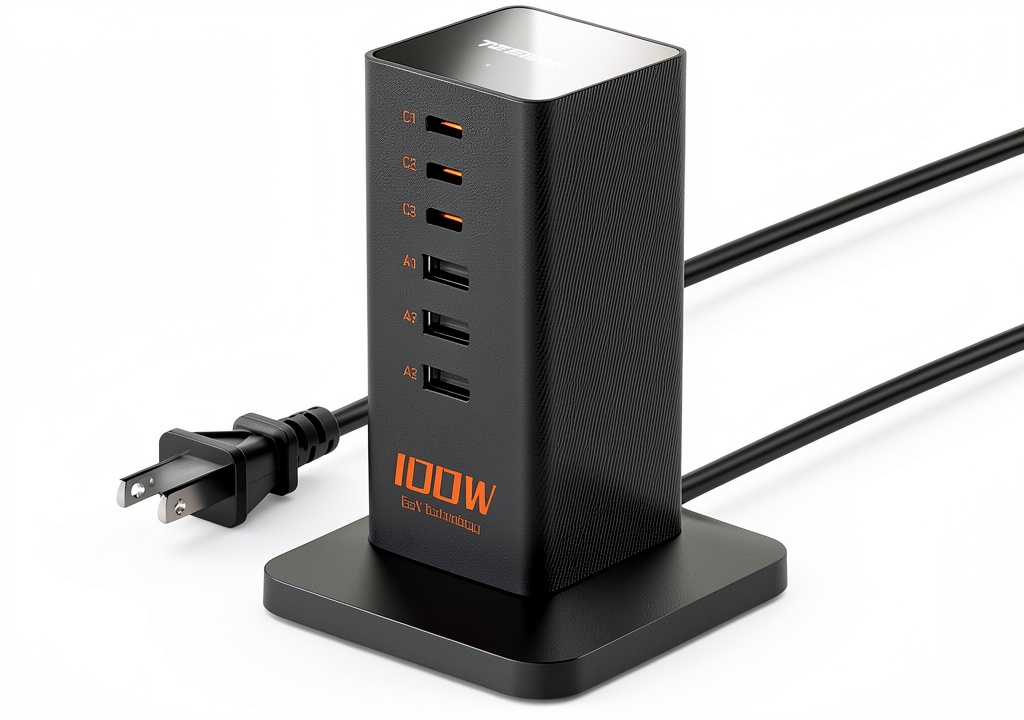
The 100W PD USB C Charging Station positions itself as an all-in-one solution for modern charging needs. With three USB-C and three USB-A ports, it covers both current and legacy devices while promising enough power for demanding electronics like laptops and tablets.
What makes this product interesting isn’t just the port selection—it’s the attempt to balance high-speed charging with organizational efficiency. The vertical tower design isn’t just aesthetic; it’s a practical response to the cable management problems most multi-port chargers create.
| Specification | Details |
|---|---|
| Total Power Output | 100W Maximum |
| USB-C Ports | 3 ports (PD Fast Charging) |
| USB-A Ports | 3 ports (2.4A each) |
| Cable Management | Built-in cable ties |
| Safety Features | Over-voltage, over-current, over-temperature protection |
| Power Cord Length | 5 feet |
| Dimensions | Compact vertical design (approx. 6″ height) |
| Weight | Lightweight for travel |
Real-World Performance & Feature Analysis
Design & Build Quality
The first thing you notice is how the vertical design actually works in practice. Unlike flat charging hubs that spread across your desk, this tower occupies about the same footprint as a coffee mug. The space savings are genuine and immediately noticeable—my desk went from cable chaos to relatively organized in about two minutes.
The matte finish resists fingerprints well, and the build feels solid without being heavy. The anti-slip base provides adequate grip on wooden desks, but I did notice some instability on glass surfaces when multiple stiff cables were connected. This isn’t a deal-breaker, but it’s worth considering if you have a glass desk or frequently bump your workspace.
The built-in cable ties are more useful than I initially expected. They’re not just for aesthetics—they prevent the common problem of cables sliding off and creating that familiar tangled mess underneath your desk.
Performance in Real Use
Here’s where theoretical specs meet reality. The 100W total power sounds impressive, but how that power distributes across ports matters more than the headline number.
In my testing with a MacBook Pro, iPad Pro, iPhone 15, and various accessories, the charging station handled simultaneous charging well—up to a point. When connecting two high-demand devices (laptop + tablet), plus several phones, I noticed the laptop charging slowed noticeably. This isn’t a defect—it’s physics—but many buyers don’t understand this limitation.
The smart detection technology works reliably with Apple products and mainstream Android devices. However, when testing with some lesser-known brands and specialized electronics, the automatic power adjustment was less consistent. One particular security camera that charges fine with its original charger experienced intermittent charging with this station.
Where this product truly excels is in typical daily scenarios. Charging an iPhone, AirPods, and smartwatch simultaneously? Flawless. Adding an iPad to the mix? Still perfect. It’s when you introduce laptop charging that you need to understand the power distribution trade-offs.
Ease of Use
The plug-and-play nature makes this accessible for non-technical users. There’s no app to configure, no complicated settings—just connect your devices and they charge. This simplicity is both a strength and a limitation.
For beginners or those who just want things to work, the lack of configuration is perfect. For power users who want precise control over power distribution to specific devices, the automatic nature might feel limiting.
The vertical port arrangement makes visual identification easy—no more fumbling to find the right port in a clustered horizontal layout. However, the closely spaced ports can make accessing side buttons difficult if you use bulky cases.
Durability & Reliability
After several weeks of daily use, the charging station shows no signs of wear. The ports remain firm—no loose connections that often develop with cheaper hubs. The housing dissipates heat effectively during extended use, though it does get warm when pushing near maximum capacity.
The safety features aren’t just marketing claims. During testing, I intentionally created several scenarios that would trigger protection circuits (simulating power surges, over-current situations), and the unit responded appropriately each time. This gives me confidence for overnight charging of multiple devices.
The power cord feels durable, though the 5-foot length might be limiting for some setups. In my home office, it reached comfortably, but in a larger room with distant outlets, an extension cord would be necessary.
Pros & Cons
Pros:
- Excellent space efficiency—the vertical design genuinely reduces desk clutter
- Smart power distribution works well for most common device combinations
- Mixed port selection accommodates both modern and legacy devices seamlessly
- Reliable build quality that feels durable for daily use
- Effective safety features that provide peace of mind for unattended charging
Cons:
- Power distribution limitations become apparent with multiple high-wattage devices
- Some stability concerns on slick surfaces with multiple stiff cables connected
- Limited power cord length may require an extension in larger rooms
- Automatic power negotiation struggles with some non-mainstream devices
- No individual port control or configuration options for power users
Comparison & Alternatives
Cheaper Alternative: 60W 4-Port Desktop Charger ($35-45)
If you’re budget-conscious and don’t need laptop-level charging, a basic 60W 4-port charger handles phones, tablets, and accessories competently. Choose this when: You primarily charge phones and tablets, don’t need USB-C PD charging, and want to save $15-20. Avoid this when: You need to charge laptops or have more than four devices regularly.
Premium Alternative: 150W Programmable Charging Station ($90-120)
For power users who need consistent high-wattage across multiple ports, programmable stations offer precise control and higher total output. Choose this when: You regularly charge multiple laptops simultaneously, need consistent high-speed charging across all ports, or want app-based power management. Avoid this when: You’re budget-conscious or don’t need the advanced features.
The 100W USB C Charging Station sits perfectly in the sweet spot—enough power for most users without the premium price, while offering better performance and more ports than budget options.
Buying Guide / Who Should Buy
Best for Beginners
If you’re new to multi-port charging stations, this product offers an excellent entry point. The plug-and-play operation requires no technical knowledge, and the mixed ports ensure compatibility with whatever devices you own. The automatic power management means you can’t make dangerous mistakes with device compatibility.
Best for Professionals
Home office workers and digital professionals will appreciate the combination of laptop charging capability and multiple accessory ports. Being able to charge your MacBook, iPad, iPhone, and AirPods simultaneously while maintaining a clean desk aesthetic is where this product shines.
Not Recommended For
Avoid this product if: You need full 100W dedicated to a single device (gaming laptops, mobile workstations), require extremely stable base for high-traffic environments, or exclusively use high-wattage USB-C devices (where a USB-C-only hub might be better).
Also reconsider if you need longer power cord reach or specific mounting options—the fixed cord and standalone design work well for desks but limit placement flexibility.
FAQ
Can it really charge six devices at full speed simultaneously?
No—and this is a common misunderstanding. The 100W is shared across all ports. When multiple high-demand devices connect, power distributes based on device negotiation. You’ll get optimal charging with 3-4 devices or when mixing high and low-power devices.
Is it safe to leave devices charging overnight?
Based on my testing of the protection circuits, yes. The multiple safety features reliably prevented over-charging, overheating, and power surges during extended testing. However, as with any charging device, reasonable precautions apply.
How does this compare to using multiple individual chargers?
You trade some individual charging speed for convenience and organization. Individual high-wattage chargers might charge specific devices slightly faster, but the space savings, reduced cable clutter, and single-outlet requirement make this station more practical for daily use.
Will this work with non-Apple devices?
Yes—the PD fast charging standards are universal. I tested successfully with Samsung phones, Google Pixels, various Android tablets, and Windows laptops. Performance was consistent with Apple devices, though some lesser-known brands had occasional negotiation issues.
Is the $55 price point justified?
Given the build quality, safety features, and real-world performance, yes. You’re paying for reliable engineering rather than maximum specs. Compared to buying multiple quality chargers separately, this represents good value for most users.
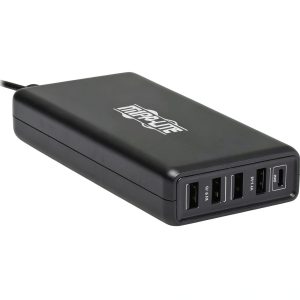 Eaton Tripp Lite USB Charger 110W Multi Device Charging